![[React/Typescript] Eslint / prettier 설치 및 기본 세팅](https://img1.daumcdn.net/thumb/R750x0/?scode=mtistory2&fname=https%3A%2F%2Fblog.kakaocdn.net%2Fdna%2FrC4V5%2FbtrrxXQ6OeL%2FAAAAAAAAAAAAAAAAAAAAAK-QPkNMlGEd0lw-S7lUwQCOIzi-paIT2rQpWkKuO7Hj%2Fimg.png%3Fcredential%3DyqXZFxpELC7KVnFOS48ylbz2pIh7yKj8%26expires%3D1774969199%26allow_ip%3D%26allow_referer%3D%26signature%3Dij3z4u8anNIbzY2RDL82CpBYFzI%253D)
Eslint / prettier 란?
각각 코드 린터, 코드 포맷터의 한 종류로 프로젝트 코드의 규칙을 점검해준다.
(코드 린터, 코드 포맷터 사이에도 디테일한 차이가 있지만 이 포스팅은 그걸 기록하기 위한 글이 아니니까 생략한다. 대신 ESlint와 prettier의 공식 페이지를 링크해둠)
ESLint - Pluggable JavaScript linter
Customize Preprocess code, use custom parsers, and write your own rules that work alongside ESLint's built-in rules. You can customize ESLint to work exactly the way you need it for your project.
eslint.org
Prettier · Opinionated Code Formatter
Opinionated Code Formatter
prettier.io
이 포스팅은 개인적인 메모를 위한 글으로, 이하의 세팅이 모든 상황에 적합하지는 않다.
각각 필요한 프로젝트의 요건에 맞추어 세팅하자.
ESlint 설치 및 설정
1. ESlint를 설치한다. 둘 중 하나만 사용하면 된다.
npm install eslint --save-dev
yarn add eslint --dev
2. 설치 후 실행한다. 마찬가지로 둘 중 하나만 사용하면 된다.
npx eslint --init
yarn run eslint --init
3. 설치를 하고 나면 몇 가지 질문이 출력된다. 필요한 조건에 맞추어 선택하면 된다.
// 메모용. 이러한 규칙은 프로젝트마다 다르게 설정할 수 있다.
How would you like to use ESlint ? => syntax, problems, style
Waht type of modiles does your project use? => Javascript modules (import/export)
Which framework does your project use? => react
Does your project use TypeScript? => Yes
Where does your code run? => Browser
How would you like to define a style for your project? => Use a popular style guide
Which style guide do you want to follow? => standard
What format do you want your config file to be in? => Javascript
Checking...
...
Would you like to install them now with npm? => yes
4. 추가로 VSCode extension에서 ESlint를 설치한다.
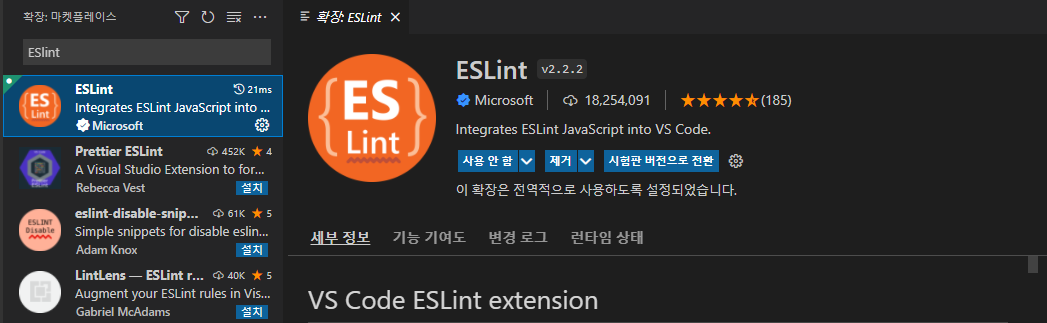
ESlint 사용
yarn run eslint .
npx eslint .
상단 명령어를 사용하면 해당 프로젝트 폴더의 모든 파일을 eslint가 검사하여 잘못된 부분이 있는지 체크해준다. 필요에 따라 .eslintrc.js파일에서 규칙을 수정해주자.
// .eslintrc.js 수정 예시
rules: {
    'react/react-in-jsx-scope': 'off',
    'react/prop-types': 'off'
 }
Prettier 설치 및 설정
1. 다음 명령어를 사용해 prettier를 설치한다.
yarn add --dev --exact prettier
2. 다음 명령어로 .prettierrc.json 파일을 생성한다.
echo {}> .prettierrc.json
3. VSCode Prettier Extention을 설치한다.
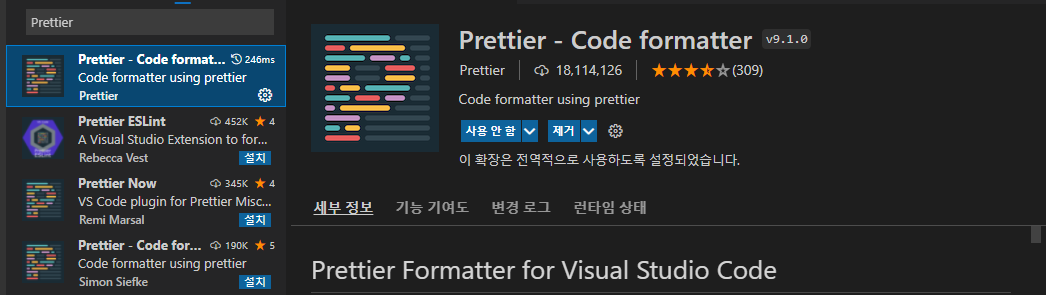
ESlint와 Prettier 연결
https://prettier.io/docs/en/install.html
Prettier · Opinionated Code Formatter
Opinionated Code Formatter
prettier.io
상단 링크의 ESlint (and other linters) 파트를 참고하면 좋다. (기록해둔 내용 전부 docs에 써있다)
1. 아래의 명령어로 eslint-config-prettier를 설치한다.
npm install --save-dev eslint-config-prettier
2. .eslintrc.js 파일의 "extends" 배열에 "prettier"를 추가해준다.
// 수정 예시
{
  "extends": [
    "plugin:react/recommended",
    "standard",
    "prettier"
  ]
}'React, Next.js' 카테고리의 다른 글
| [React] 클래스형 컴포넌트 vs 함수형 컴포넌트 (0) | 2022.02.09 |
|---|---|
| [React] 자주 쓰는 React 기반 라이브러리, 프레임워크 모음 (0) | 2022.02.05 |
| [React] 리액트의 핵심 2, Props (0) | 2022.01.20 |
| [React] 리액트의 핵심, State (with useState) (0) | 2022.01.20 |
| [React] 컴포넌트 디자인 패턴 - container / presenter 패턴 (0) | 2022.01.20 |